> ## Documentation Index
> Fetch the complete documentation index at: https://docs.clawup.org/llms.txt
> Use this file to discover all available pages before exploring further.
# Connect a Subscription
> Power an agent with your existing Claude or ChatGPT subscription instead of an API key — how to connect it, and how the provider bills agent usage.
If you already pay for **Claude** or **ChatGPT**, you can point an agent at that subscription instead of buying an API key or ClawUp Token Credits. ClawUp itself adds **no token fee** — it bills only for **compute + storage**.
> **Read the billing note first.** "Subscription" does **not** mean free or unlimited for agents. Your agent makes *programmatic* calls, which the provider meters on a **separate track from your interactive chat** (Claude's "extra usage"; ChatGPT's Codex/Agent allotment) — see [Billing and limits](#billing-and-limits) below. Connecting a subscription avoids ClawUp's token fee; it does not bypass the provider's usage accounting.
This is one of the three model-access modes — see [Billing → Tokens](./billing#tokens-llm-api-usage) for how it compares to **BYOK** and **ClawUp-managed models**.
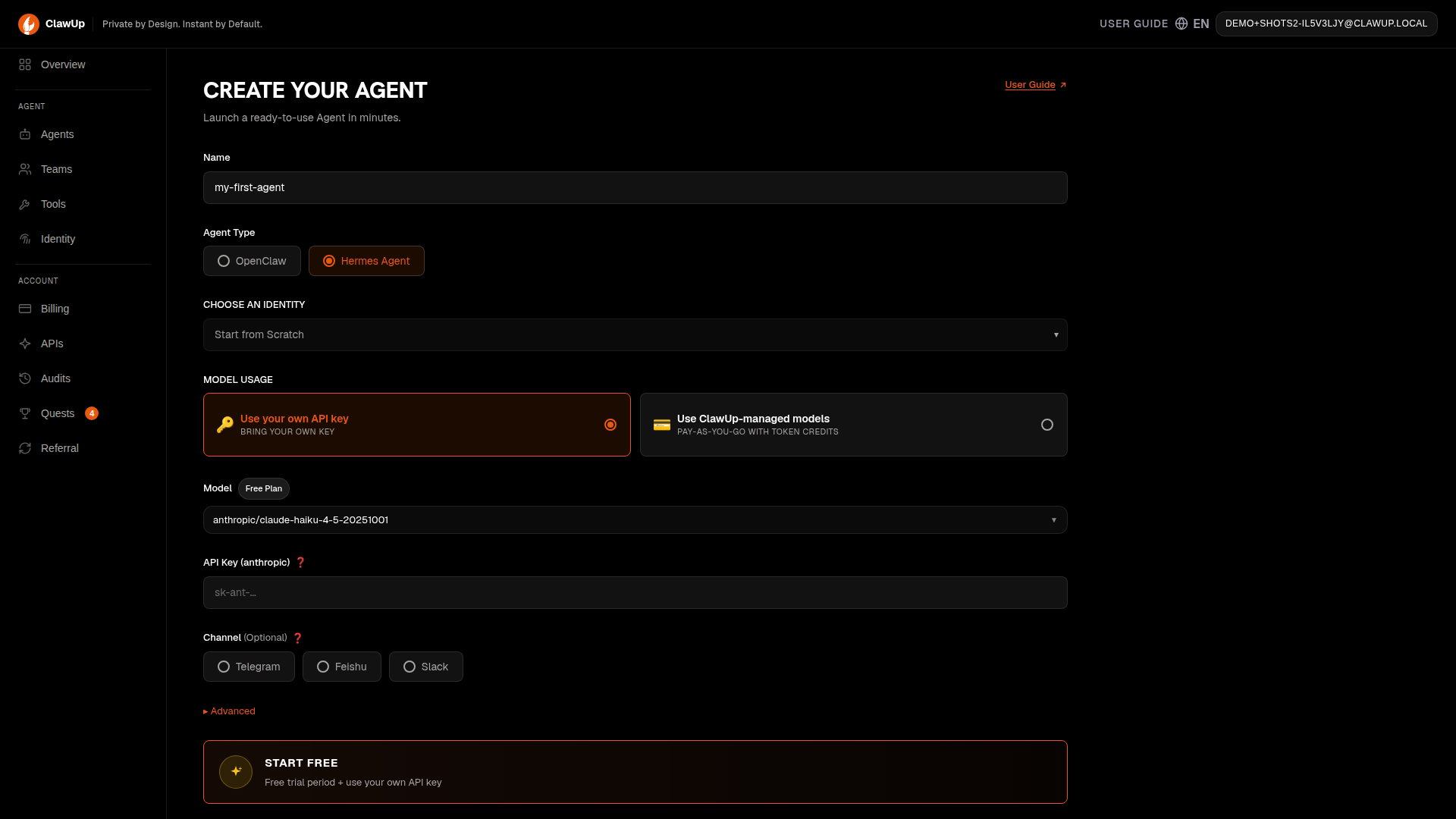
> **Runtime support.** Subscription login is available **only on the OpenClaw runtime**. In **Create Agent**, the "Connect a subscription" option is hidden when you select **Hermes** — Hermes authenticates with a provider **API key** (BYOK or managed), not a subscription login.
 ## How it works
OpenClaw signs in to the provider with your **subscription login** rather than an API key, and refreshes it automatically. You obtain the credential once with the provider's own tool and paste it into ClawUp at create time. The two providers use different credential shapes:
* **Claude** — a single long-lived token from `claude setup-token` (starts `sk-ant-oat01-…`).
* **ChatGPT** — an OAuth credential (access + refresh tokens) that the **Codex** CLI saves to `~/.codex/auth.json`; you paste that file's contents.
Either way, the credential is stored only inside your agent's runtime.
## Connect a Claude subscription
### 1. Generate a subscription token
On your own machine, with the [Claude Code](https://code.claude.com/docs/en/authentication) CLI installed and signed in to a **Pro, Max, Team, or Enterprise** plan, run:
```bash theme={null}
claude setup-token
```
* It opens a browser to approve access, then **prints a token to the terminal** (it isn't saved anywhere — copy it now).
* The token starts with `sk-ant-oat01-…` and is valid for about **one year**.
* Treat it like a password — anyone with it can use your Claude subscription.
> **Copy the token from the *terminal*, not the code from the *browser*.**
> After you approve access, the browser may show a value like `aB3xY…#kJ9pQ…` — a `#`-joined string. That is the **authorization code**, an intermediate step, **not** the token. The real credential is the `sk-ant-oat01-…` value that `claude setup-token` prints **in your terminal**. If the terminal pauses and asks you to *paste the code*, paste that browser value **into the terminal** — the command then completes the exchange and prints the `sk-ant-oat01-…` token. Only `sk-ant-oat01-…` works in ClawUp.
### 2. Create the agent with it
In ClawUp, open **Create Agent**:
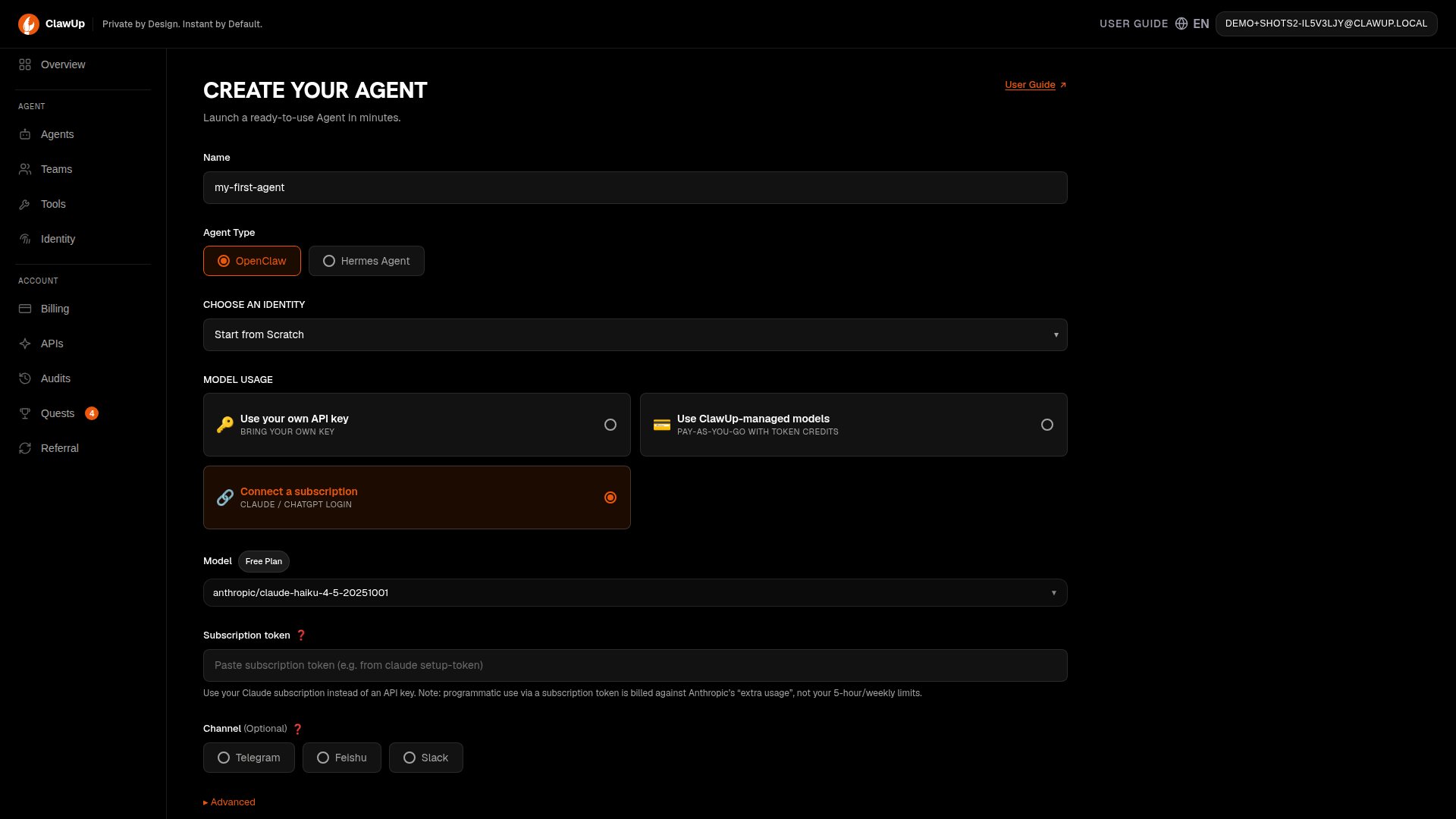
1. Under **Model Usage**, choose **🔗 Connect a subscription**.
2. Set the provider to **Claude (Anthropic)** and pick a model.
3. Paste the `sk-ant-oat01-…` token into the **Subscription token** field.
4. Create the agent.
## How it works
OpenClaw signs in to the provider with your **subscription login** rather than an API key, and refreshes it automatically. You obtain the credential once with the provider's own tool and paste it into ClawUp at create time. The two providers use different credential shapes:
* **Claude** — a single long-lived token from `claude setup-token` (starts `sk-ant-oat01-…`).
* **ChatGPT** — an OAuth credential (access + refresh tokens) that the **Codex** CLI saves to `~/.codex/auth.json`; you paste that file's contents.
Either way, the credential is stored only inside your agent's runtime.
## Connect a Claude subscription
### 1. Generate a subscription token
On your own machine, with the [Claude Code](https://code.claude.com/docs/en/authentication) CLI installed and signed in to a **Pro, Max, Team, or Enterprise** plan, run:
```bash theme={null}
claude setup-token
```
* It opens a browser to approve access, then **prints a token to the terminal** (it isn't saved anywhere — copy it now).
* The token starts with `sk-ant-oat01-…` and is valid for about **one year**.
* Treat it like a password — anyone with it can use your Claude subscription.
> **Copy the token from the *terminal*, not the code from the *browser*.**
> After you approve access, the browser may show a value like `aB3xY…#kJ9pQ…` — a `#`-joined string. That is the **authorization code**, an intermediate step, **not** the token. The real credential is the `sk-ant-oat01-…` value that `claude setup-token` prints **in your terminal**. If the terminal pauses and asks you to *paste the code*, paste that browser value **into the terminal** — the command then completes the exchange and prints the `sk-ant-oat01-…` token. Only `sk-ant-oat01-…` works in ClawUp.
### 2. Create the agent with it
In ClawUp, open **Create Agent**:
1. Under **Model Usage**, choose **🔗 Connect a subscription**.
2. Set the provider to **Claude (Anthropic)** and pick a model.
3. Paste the `sk-ant-oat01-…` token into the **Subscription token** field.
4. Create the agent.
 The **Model** field is a searchable picker grouped by provider — click it to browse available models.
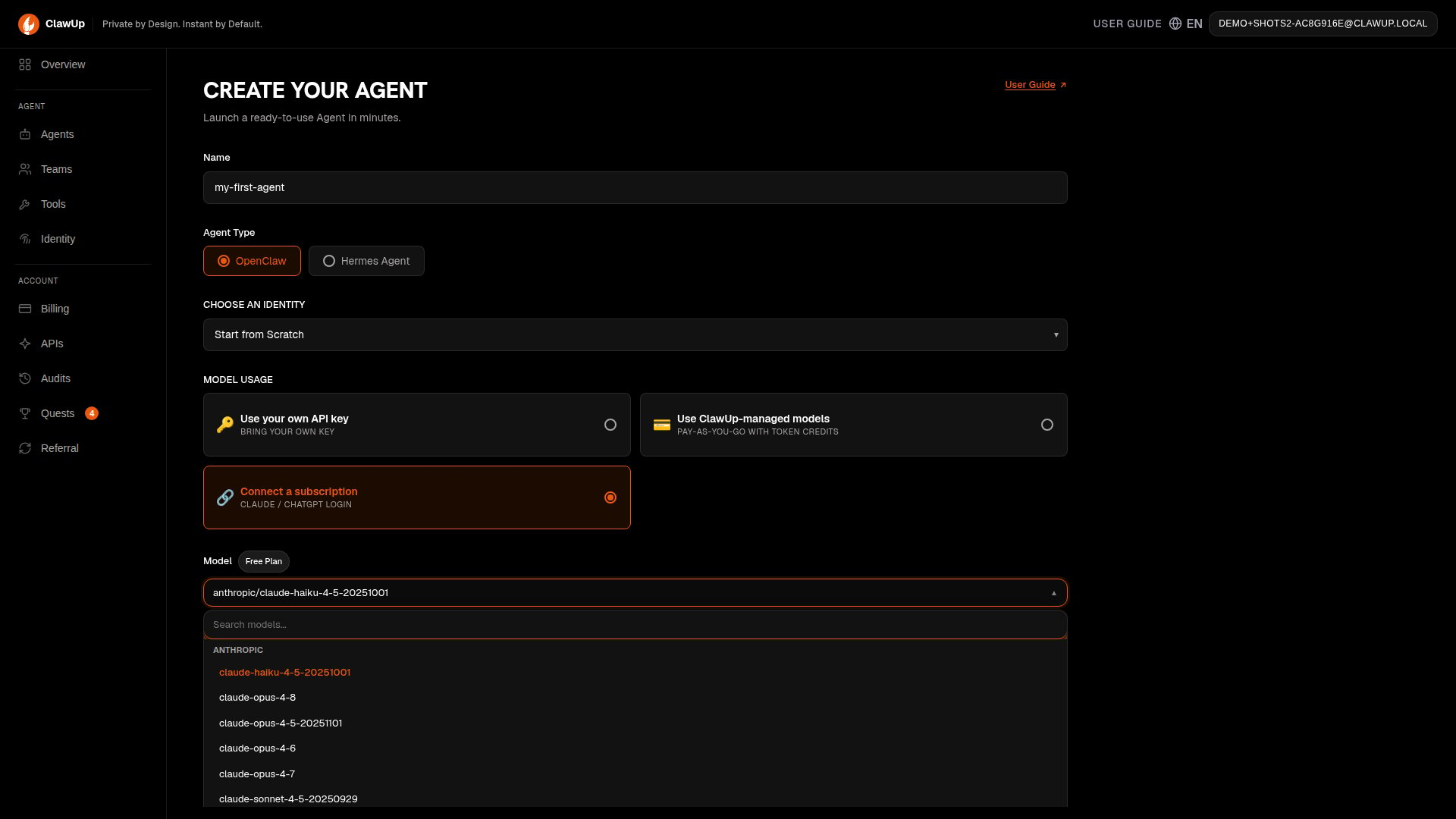 That's it — the token is stored in your agent's runtime and used for every request. There's no API key to manage and no Token Credits to top up.
> The token field expects the `sk-ant-oat01-…` value. A subscription token (`sk-ant-oat01-…`) is sent as a Bearer login; any other value is treated as a plain API key, which a Claude subscription will reject.
### Troubleshooting (Claude)
* **Agent replies with `HTTP 401 … invalid x-api-key`.** The value you pasted wasn't an `sk-ant-oat01-…` token — almost always the **authorization code** copied from the browser (the `…#…` string) rather than the token printed in the terminal. Re-run `claude setup-token`, copy the `sk-ant-oat01-…` value from the **terminal**, and update the agent's subscription token. (Internally: only `sk-ant-oat…` credentials are sent as a Bearer login; everything else is sent as `x-api-key`, which a subscription rejects.)
* **`claude setup-token` only shows me a `…#…` code, never `sk-ant-oat01-…`.** You're reading the browser, not the terminal. Return to the terminal window where you ran the command — paste the browser code there if prompted, and it will print the `sk-ant-oat01-…` token.
* **It worked, then stopped after \~a year.** The token expired — generate a new one and update the agent.
## Connect a ChatGPT (OpenAI) subscription
You can also connect a **ChatGPT** subscription. It works differently from Claude: instead of a single token, ChatGPT uses an **OAuth credential** (access + refresh tokens) that OpenAI's **Codex** CLI stores in `~/.codex/auth.json`.
### 1. Sign in with Codex
On your own machine, install OpenAI's **Codex** CLI and sign in with your **ChatGPT Plus / Pro** account. The login writes your credential to:
```
~/.codex/auth.json
```
### 2. Create the agent with it
1. Under **Model Usage**, choose **🔗 Connect a subscription**.
2. Pick an **OpenAI / ChatGPT** model — **GPT‑5.5** is recommended.
3. Paste the **entire contents of `~/.codex/auth.json`** into the **Subscription** field (it's a JSON blob, not a single token).
4. Create the agent.
> Codex with a **ChatGPT account** only accepts a subset of models — generally **gpt‑5.5** (recommended), **gpt‑5.4**, and **gpt‑5.4‑mini**. Some models are gated further (e.g. `gpt‑5.3‑codex‑spark` is **ChatGPT Pro**-only) and others (`gpt‑5.2`, `gpt‑5.x‑codex`) are **API‑key‑only**; all of those return `model is not supported when using Codex with a ChatGPT account`. OpenAI changes this set over time — see [Codex models](https://developers.openai.com/codex/models).
ClawUp turns that into the OAuth profile the runtime needs and refreshes it automatically.
### Troubleshooting (ChatGPT)
* **`OAuth token refresh failed for openai-codex`.** The pasted credential is invalid, expired, or partial. Re-run the Codex sign-in, then paste the **full, current** contents of `~/.codex/auth.json` and update the agent.
* **`out of … usage` / quota errors.** Expected when your OpenAI programmatic/Codex allotment is exhausted — see [Billing and limits](#billing-and-limits). Agent usage doesn't draw on unlimited subscription chat.
## Billing and limits
An agent's calls are **programmatic** usage, which the provider meters on a different track from your interactive chat. This is the part most people get wrong:
* **Claude.** A `setup-token` (Agent‑SDK‑style) credential is **not** counted against your interactive **5‑hour / weekly** limits. Anthropic intends a separate **monthly "Agent SDK" credit** ($20 Pro, $100 Max 5×, \$200 Max 20×) to cover it, but **that credit was paused on 2026‑06‑15** — so today the calls fall through to **"extra usage"** (pay‑per‑token credits at [claude.ai/settings/usage](https://claude.ai/settings/usage)). If extra usage isn't enabled, the agent replies `LLM request rejected: You're out of extra usage`. So you can have full chat quota left and still need extra usage enabled for the agent. This is Anthropic's policy and is in flux — check their current rules.
* **ChatGPT.** Codex/Agent usage is metered against your OpenAI **usage allotment** for programmatic Codex use, the same way the Codex CLI is — not unlimited subscription chat.
* **ClawUp's part.** ClawUp adds **no token fee** and bills only **compute + storage** (see [Billing](./billing)); the **provider's** usage rules above are separate and still apply.
## Good to know
* **Credential refresh** is automatic — OpenClaw keeps the login fresh, and your agent's credentials are preserved across stop/start and restore.
* **Expiry** — `claude setup-token` tokens last about a year; ChatGPT credentials refresh via the stored refresh token. If a credential lapses, regenerate it and update the agent.
* **Security** — these credentials are sensitive. ClawUp stores them only inside your agent's runtime; revoke them from your Claude / ChatGPT account if ever exposed.
## Related
* [Billing](./billing) — plans, pricing, and the three model-access modes
* [Runtimes](./runtimes) — OpenClaw vs Hermes
* OpenClaw [OAuth concept](https://docs.openclaw.ai/concepts/oauth) · Claude Code [authentication](https://code.claude.com/docs/en/authentication)
That's it — the token is stored in your agent's runtime and used for every request. There's no API key to manage and no Token Credits to top up.
> The token field expects the `sk-ant-oat01-…` value. A subscription token (`sk-ant-oat01-…`) is sent as a Bearer login; any other value is treated as a plain API key, which a Claude subscription will reject.
### Troubleshooting (Claude)
* **Agent replies with `HTTP 401 … invalid x-api-key`.** The value you pasted wasn't an `sk-ant-oat01-…` token — almost always the **authorization code** copied from the browser (the `…#…` string) rather than the token printed in the terminal. Re-run `claude setup-token`, copy the `sk-ant-oat01-…` value from the **terminal**, and update the agent's subscription token. (Internally: only `sk-ant-oat…` credentials are sent as a Bearer login; everything else is sent as `x-api-key`, which a subscription rejects.)
* **`claude setup-token` only shows me a `…#…` code, never `sk-ant-oat01-…`.** You're reading the browser, not the terminal. Return to the terminal window where you ran the command — paste the browser code there if prompted, and it will print the `sk-ant-oat01-…` token.
* **It worked, then stopped after \~a year.** The token expired — generate a new one and update the agent.
## Connect a ChatGPT (OpenAI) subscription
You can also connect a **ChatGPT** subscription. It works differently from Claude: instead of a single token, ChatGPT uses an **OAuth credential** (access + refresh tokens) that OpenAI's **Codex** CLI stores in `~/.codex/auth.json`.
### 1. Sign in with Codex
On your own machine, install OpenAI's **Codex** CLI and sign in with your **ChatGPT Plus / Pro** account. The login writes your credential to:
```
~/.codex/auth.json
```
### 2. Create the agent with it
1. Under **Model Usage**, choose **🔗 Connect a subscription**.
2. Pick an **OpenAI / ChatGPT** model — **GPT‑5.5** is recommended.
3. Paste the **entire contents of `~/.codex/auth.json`** into the **Subscription** field (it's a JSON blob, not a single token).
4. Create the agent.
> Codex with a **ChatGPT account** only accepts a subset of models — generally **gpt‑5.5** (recommended), **gpt‑5.4**, and **gpt‑5.4‑mini**. Some models are gated further (e.g. `gpt‑5.3‑codex‑spark` is **ChatGPT Pro**-only) and others (`gpt‑5.2`, `gpt‑5.x‑codex`) are **API‑key‑only**; all of those return `model is not supported when using Codex with a ChatGPT account`. OpenAI changes this set over time — see [Codex models](https://developers.openai.com/codex/models).
ClawUp turns that into the OAuth profile the runtime needs and refreshes it automatically.
### Troubleshooting (ChatGPT)
* **`OAuth token refresh failed for openai-codex`.** The pasted credential is invalid, expired, or partial. Re-run the Codex sign-in, then paste the **full, current** contents of `~/.codex/auth.json` and update the agent.
* **`out of … usage` / quota errors.** Expected when your OpenAI programmatic/Codex allotment is exhausted — see [Billing and limits](#billing-and-limits). Agent usage doesn't draw on unlimited subscription chat.
## Billing and limits
An agent's calls are **programmatic** usage, which the provider meters on a different track from your interactive chat. This is the part most people get wrong:
* **Claude.** A `setup-token` (Agent‑SDK‑style) credential is **not** counted against your interactive **5‑hour / weekly** limits. Anthropic intends a separate **monthly "Agent SDK" credit** ($20 Pro, $100 Max 5×, \$200 Max 20×) to cover it, but **that credit was paused on 2026‑06‑15** — so today the calls fall through to **"extra usage"** (pay‑per‑token credits at [claude.ai/settings/usage](https://claude.ai/settings/usage)). If extra usage isn't enabled, the agent replies `LLM request rejected: You're out of extra usage`. So you can have full chat quota left and still need extra usage enabled for the agent. This is Anthropic's policy and is in flux — check their current rules.
* **ChatGPT.** Codex/Agent usage is metered against your OpenAI **usage allotment** for programmatic Codex use, the same way the Codex CLI is — not unlimited subscription chat.
* **ClawUp's part.** ClawUp adds **no token fee** and bills only **compute + storage** (see [Billing](./billing)); the **provider's** usage rules above are separate and still apply.
## Good to know
* **Credential refresh** is automatic — OpenClaw keeps the login fresh, and your agent's credentials are preserved across stop/start and restore.
* **Expiry** — `claude setup-token` tokens last about a year; ChatGPT credentials refresh via the stored refresh token. If a credential lapses, regenerate it and update the agent.
* **Security** — these credentials are sensitive. ClawUp stores them only inside your agent's runtime; revoke them from your Claude / ChatGPT account if ever exposed.
## Related
* [Billing](./billing) — plans, pricing, and the three model-access modes
* [Runtimes](./runtimes) — OpenClaw vs Hermes
* OpenClaw [OAuth concept](https://docs.openclaw.ai/concepts/oauth) · Claude Code [authentication](https://code.claude.com/docs/en/authentication)