> ## Documentation Index
> Fetch the complete documentation index at: https://docs.clawup.org/llms.txt
> Use this file to discover all available pages before exploring further.
# Teams
> Create multi-agent groups that work together
Teams let you create multi-agent groups that work together. Each team member is an Agent with a specific role and persona. Instead of manually creating individual Agents and wiring them together, Teams automates the entire setup.
## Communication Modes
When creating a team, you choose how members communicate:
| Mode | Containers | Communication | Best for |
| -------------------------- | ------------------ | ------------------------------------------------------------------- | -------------------------------------------------------------------------- |
| **SubAgent** (recommended) | 1 (leader only) | `sessions_spawn` / `sessions_send` — built-in Hermes Agent sessions | Fast responses, low cost, most use cases |
| **MultiAgent** | N (one per member) | `remote_send` / `remote_spawn` via Claw Connect MCP | Different models per role, cross-team networking, multi-user collaboration |
### SubAgent Mode
In SubAgent mode, the leader bot runs a single container. Team members exist as virtual personas within the leader's prompt. The leader role-plays each member inline — analyzing the task, thinking from each member's perspective, and synthesizing the results.
This is faster and cheaper because everything happens in a single context window with no network overhead or tool calls.
### MultiAgent Mode
In MultiAgent mode, each team member is a separate container with its own model and API key. Members communicate through [Claw Connect](./claw-connect) MCP tools over the network. This mode supports different models per role (e.g., GPT-5.4 for the leader, Claude Haiku 4.5 for researchers), cross-team communication via Nebula, and multi-user collaboration — multiple people can interact with different team members simultaneously through their own messaging channels.
## Creating a Team
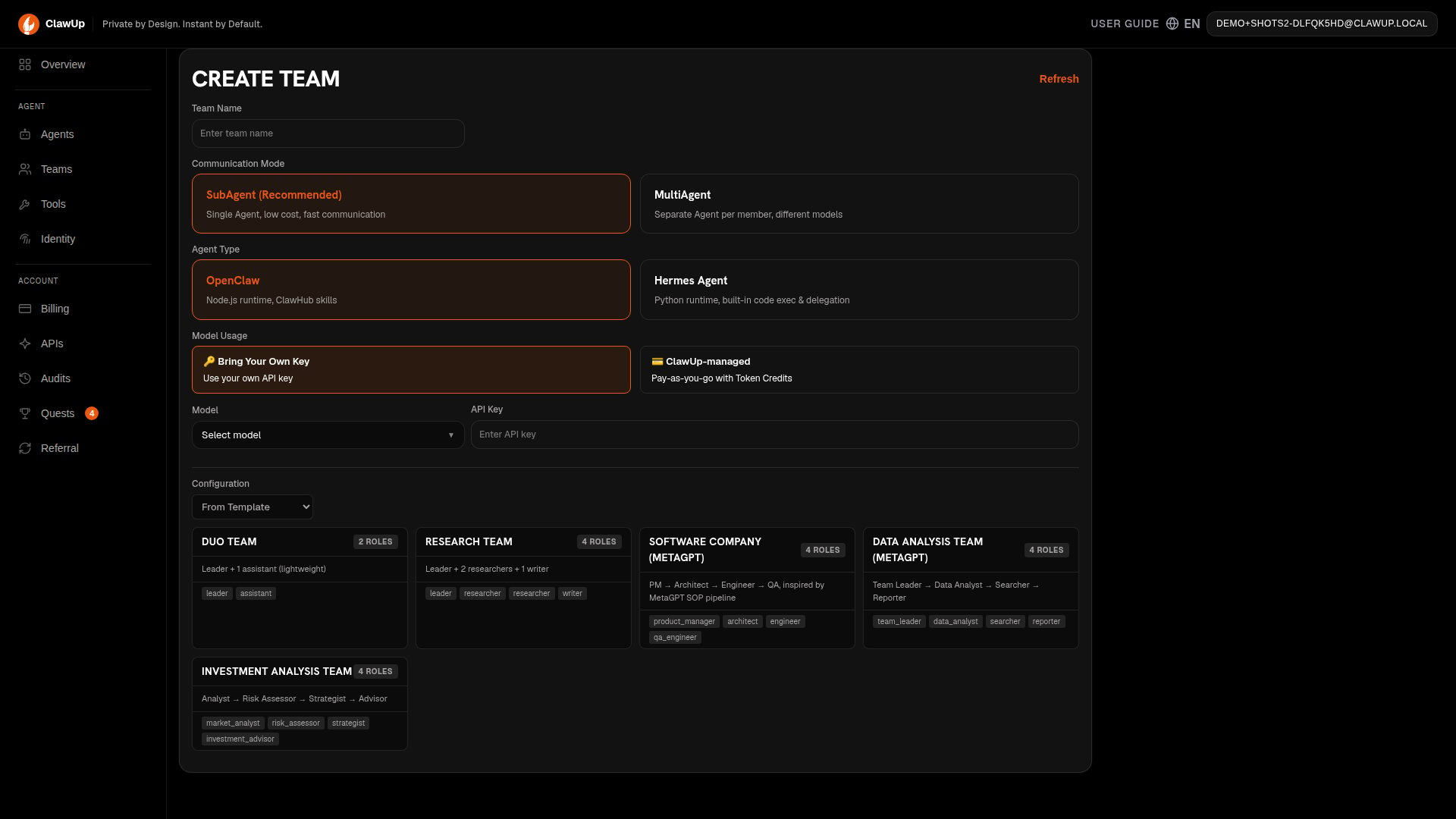
Go to **Teams** in the left sidebar, or use the **Create New Team** card on the **Overview** page. Unlike creating a single Agent, team creation is one scrollable **Create Team** page rather than a multi-step wizard:
1. **Team Name** — e.g., "My Research Team"
2. **Communication Mode** — **SubAgent** (recommended) or **MultiAgent**
3. **Agent Type** — the runtime engine for the team, **OpenClaw** or **Hermes Agent** (same choice as for a single Agent — see [Runtimes](./runtimes))
4. **Model Usage** — **Bring Your Own Key** (use your own provider API key) or **ClawUp-managed** (pay-as-you-go with Token Credits), then **Model** and, for BYOK, **API Key**
5. **Configuration** — build the team from a **Template** or **AI Generate** (below)
 ### From Template
Choose one of the five built-in templates:
| Template | Roles | Workflow |
| -------------------------------- | --------------------------------------------- | ---------------------------------------------------------------------------------------------------- |
| **Duo Team** | Leader, Assistant | A lightweight two-role team for simple delegation |
| **Research Team** | Leader, 2 Researchers, Writer | Leader assigns research tasks, researchers gather findings, writer compiles the report |
| **Software Company (MetaGPT)** | PM, Architect, Engineer, QA | PM defines requirements, architect designs, engineer implements, QA validates |
| **Data Analysis Team (MetaGPT)** | Team Leader, Data Analyst, Searcher, Reporter | Leader coordinates, analyst processes data, searcher gathers sources, reporter writes output |
| **Investment Analysis Team** | Analyst, Risk Assessor, Strategist, Advisor | Analyst reviews data, risk assessor evaluates risks, strategist plans, advisor gives recommendations |
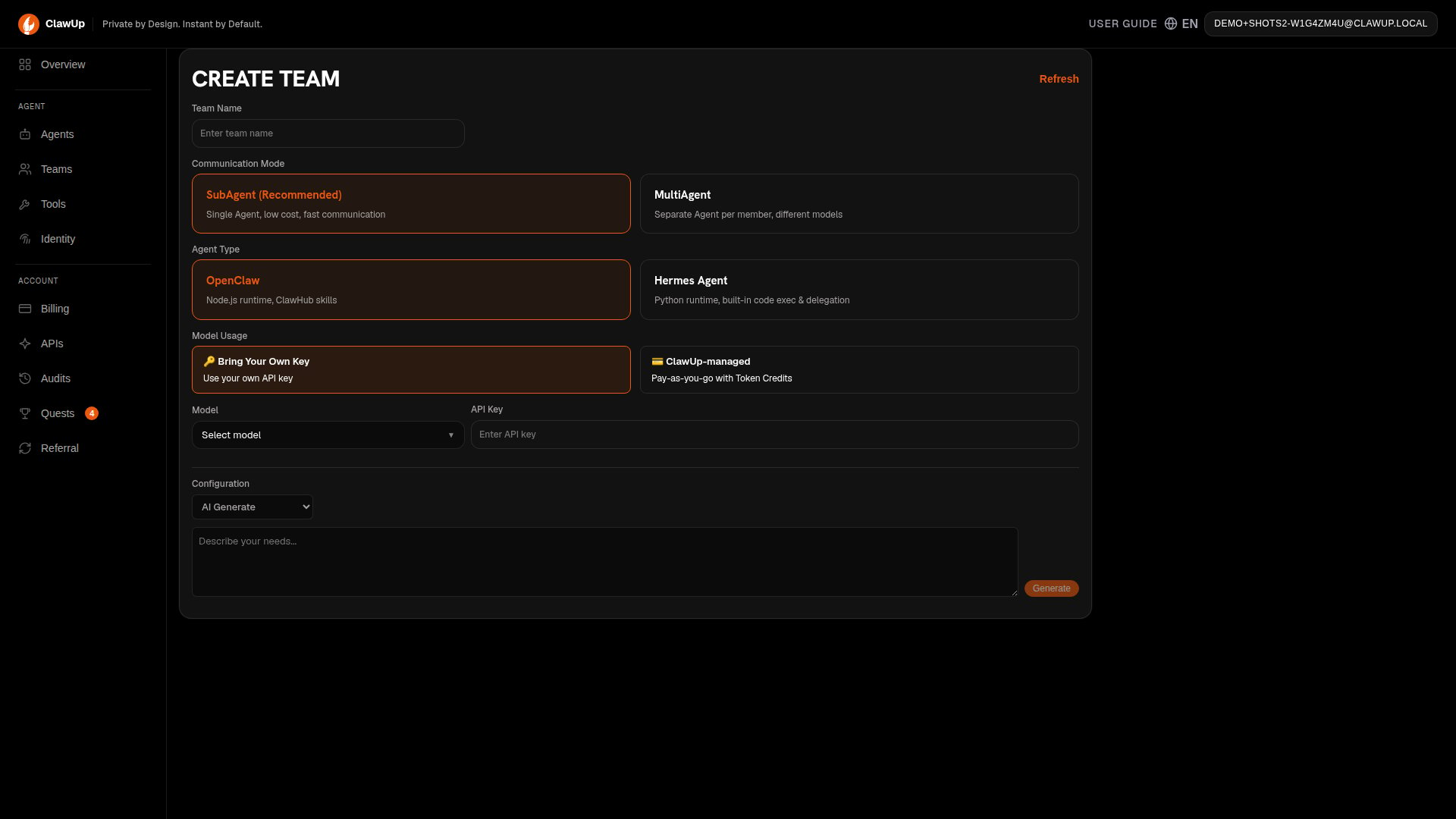
### AI Generate
Switch the **Configuration** dropdown to **AI Generate**:
1. Describe what you need in one sentence (e.g., "Help me analyze the crypto market")
2. Click **Generate** — the AI creates team roles and personas automatically
3. Review and edit the generated configuration before proceeding
### From Template
Choose one of the five built-in templates:
| Template | Roles | Workflow |
| -------------------------------- | --------------------------------------------- | ---------------------------------------------------------------------------------------------------- |
| **Duo Team** | Leader, Assistant | A lightweight two-role team for simple delegation |
| **Research Team** | Leader, 2 Researchers, Writer | Leader assigns research tasks, researchers gather findings, writer compiles the report |
| **Software Company (MetaGPT)** | PM, Architect, Engineer, QA | PM defines requirements, architect designs, engineer implements, QA validates |
| **Data Analysis Team (MetaGPT)** | Team Leader, Data Analyst, Searcher, Reporter | Leader coordinates, analyst processes data, searcher gathers sources, reporter writes output |
| **Investment Analysis Team** | Analyst, Risk Assessor, Strategist, Advisor | Analyst reviews data, risk assessor evaluates risks, strategist plans, advisor gives recommendations |
### AI Generate
Switch the **Configuration** dropdown to **AI Generate**:
1. Describe what you need in one sentence (e.g., "Help me analyze the crypto market")
2. Click **Generate** — the AI creates team roles and personas automatically
3. Review and edit the generated configuration before proceeding
 ### Roles, Leader, and Channels
After selecting a template or generating roles, review and edit each team member's persona — each role has a name, description, and system prompt that defines how it behaves. Select a **Leader** for the team (the member you interact with directly, who coordinates the others), and optionally configure a messaging channel (Telegram, Feishu, Slack) for the leader so you can chat with the team from your preferred platform.
### Create
Click **Create Team**. In SubAgent mode, one container is provisioned with a composite prompt. In MultiAgent mode, all members are provisioned as separate containers with Claw Connect networking. This typically takes 1-3 minutes.
## Team Operations
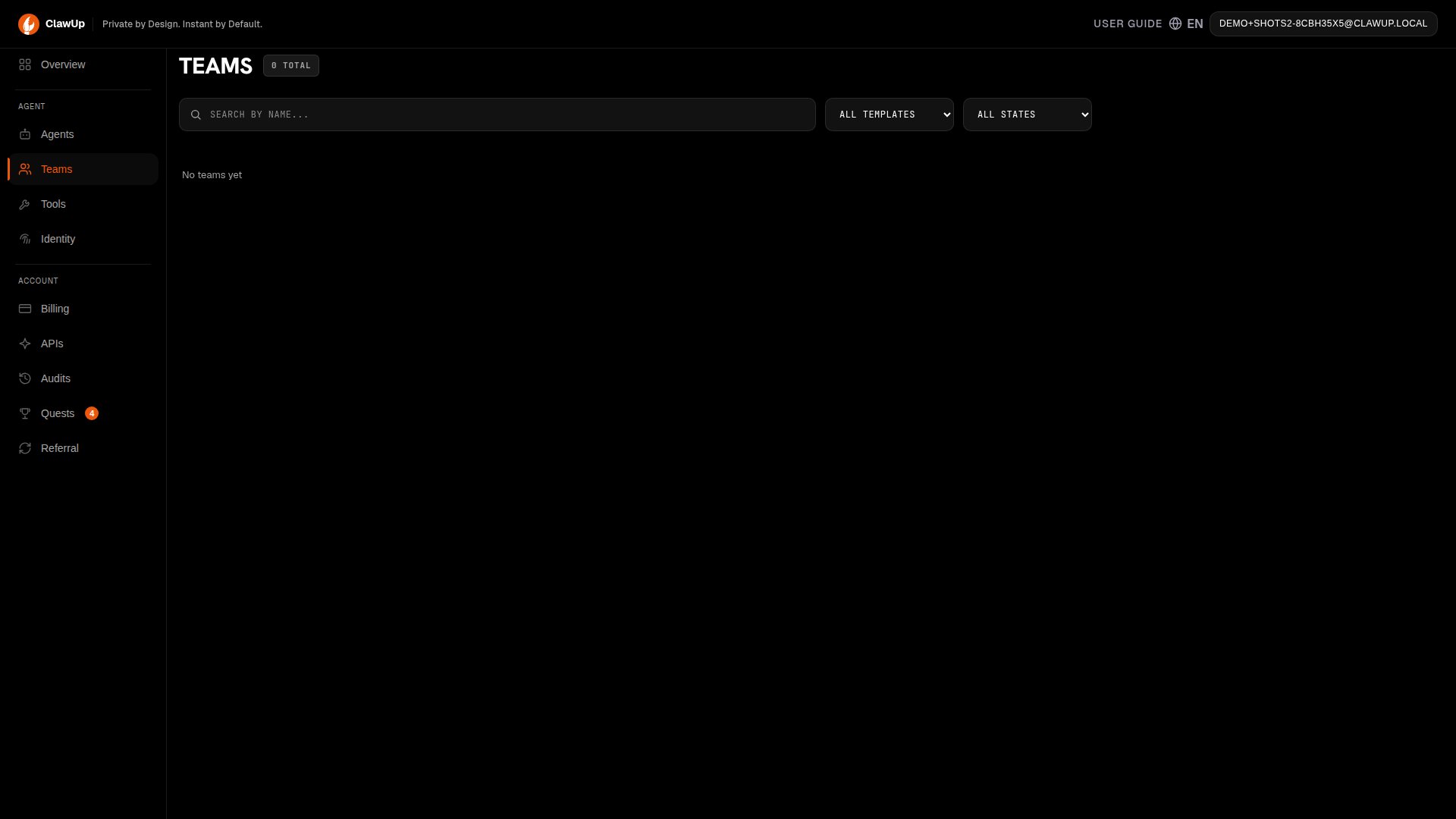
Once a team is created, you can manage it from the **Teams** page, which lists every team you've created (searchable by name, filterable by template and state):
### Roles, Leader, and Channels
After selecting a template or generating roles, review and edit each team member's persona — each role has a name, description, and system prompt that defines how it behaves. Select a **Leader** for the team (the member you interact with directly, who coordinates the others), and optionally configure a messaging channel (Telegram, Feishu, Slack) for the leader so you can chat with the team from your preferred platform.
### Create
Click **Create Team**. In SubAgent mode, one container is provisioned with a composite prompt. In MultiAgent mode, all members are provisioned as separate containers with Claw Connect networking. This typically takes 1-3 minutes.
## Team Operations
Once a team is created, you can manage it from the **Teams** page, which lists every team you've created (searchable by name, filterable by template and state):
 From there you can:
* **Stop** — Pauses all team members at once
* **Start** — Resumes a stopped team
* **Delete** — Removes the team and all its members
* **Quick Chat** — Send messages directly to the team leader from the console
## How Teams Communicate
### SubAgent Mode (inline personas)
In SubAgent mode, the leader handles all team member perspectives within a single conversation turn. No tools or sessions are needed — the leader role-plays each member inline.
**Example prompt:**
```
Research AI safety trends and compile a report.
```
**SubAgent communication flow:**
```
You → Leader: "Research AI safety trends"
Leader thinks as Researcher 1: gathers findings on academic papers
Leader thinks as Researcher 2: gathers findings on industry practices
Leader thinks as Writer: compiles findings into a report
Leader → You: "Report complete: ..."
```
### MultiAgent Mode (Claw Connect)
In MultiAgent mode, team members communicate through [Claw Connect](./claw-connect) MCP tools over the network. Each member is a separate container.
| Tool | What it does | When to use |
| ----------------- | ------------------------------------------------ | ------------------------------------ |
| `remote_send` | Send a message and get a direct reply | Quick questions, short instructions |
| `remote_spawn` | Delegate a background task (returns immediately) | Long-running research, parallel work |
| `get_task_result` | Check the result of a spawned task | Poll for completion |
| `list_peers` | List all online team members | Check who's available |
**Example — MultiAgent delegation:**
```
Use remote_spawn to send research tasks to both researchers in parallel:
- abc-research-1: Research academic AI safety papers from 2024-2025
- abc-research-2: Research industry AI safety practices and standards
Then wait for both results and ask abc-writer to compile them into a report.
```
**MultiAgent communication flow:**
```
You → Leader: "Research AI safety trends"
Leader → Researcher 1: remote_spawn("Research recent AI safety papers")
Leader → Researcher 2: remote_spawn("Research industry AI safety practices")
Researcher 1 → Leader: task completed with findings
Researcher 2 → Leader: task completed with findings
Leader → Writer: remote_spawn("Compile these findings into a report")
Writer → Leader: task completed with report
Leader → You: "Report complete: ..."
```
All networking is set up automatically when you create the team. You do not need to manually configure Claw Connect, create nebula, or set agent names.
> **Tip:** For more details on MultiAgent communication tools, see the [Claw Connect documentation](./claw-connect#5-available-tools).
## Session Persistence
Team conversations persist across restarts. If a team is stopped and restarted, the session history is preserved so the team can pick up where it left off.
## Billing
* **SubAgent mode** — Only 1 container is billed (the leader). A 4-member team costs 1 x \$10/month on the Basic plan.
* **MultiAgent mode** — Each member is a separate container. A 4-member team costs 4 x \$10/month = \$40/month on the Basic plan.
Make sure your account has sufficient balance before creating a team.
From there you can:
* **Stop** — Pauses all team members at once
* **Start** — Resumes a stopped team
* **Delete** — Removes the team and all its members
* **Quick Chat** — Send messages directly to the team leader from the console
## How Teams Communicate
### SubAgent Mode (inline personas)
In SubAgent mode, the leader handles all team member perspectives within a single conversation turn. No tools or sessions are needed — the leader role-plays each member inline.
**Example prompt:**
```
Research AI safety trends and compile a report.
```
**SubAgent communication flow:**
```
You → Leader: "Research AI safety trends"
Leader thinks as Researcher 1: gathers findings on academic papers
Leader thinks as Researcher 2: gathers findings on industry practices
Leader thinks as Writer: compiles findings into a report
Leader → You: "Report complete: ..."
```
### MultiAgent Mode (Claw Connect)
In MultiAgent mode, team members communicate through [Claw Connect](./claw-connect) MCP tools over the network. Each member is a separate container.
| Tool | What it does | When to use |
| ----------------- | ------------------------------------------------ | ------------------------------------ |
| `remote_send` | Send a message and get a direct reply | Quick questions, short instructions |
| `remote_spawn` | Delegate a background task (returns immediately) | Long-running research, parallel work |
| `get_task_result` | Check the result of a spawned task | Poll for completion |
| `list_peers` | List all online team members | Check who's available |
**Example — MultiAgent delegation:**
```
Use remote_spawn to send research tasks to both researchers in parallel:
- abc-research-1: Research academic AI safety papers from 2024-2025
- abc-research-2: Research industry AI safety practices and standards
Then wait for both results and ask abc-writer to compile them into a report.
```
**MultiAgent communication flow:**
```
You → Leader: "Research AI safety trends"
Leader → Researcher 1: remote_spawn("Research recent AI safety papers")
Leader → Researcher 2: remote_spawn("Research industry AI safety practices")
Researcher 1 → Leader: task completed with findings
Researcher 2 → Leader: task completed with findings
Leader → Writer: remote_spawn("Compile these findings into a report")
Writer → Leader: task completed with report
Leader → You: "Report complete: ..."
```
All networking is set up automatically when you create the team. You do not need to manually configure Claw Connect, create nebula, or set agent names.
> **Tip:** For more details on MultiAgent communication tools, see the [Claw Connect documentation](./claw-connect#5-available-tools).
## Session Persistence
Team conversations persist across restarts. If a team is stopped and restarted, the session history is preserved so the team can pick up where it left off.
## Billing
* **SubAgent mode** — Only 1 container is billed (the leader). A 4-member team costs 1 x \$10/month on the Basic plan.
* **MultiAgent mode** — Each member is a separate container. A 4-member team costs 4 x \$10/month = \$40/month on the Basic plan.
Make sure your account has sufficient balance before creating a team.