

Read the billing note first. “Subscription” does not mean free or unlimited for agents. Your agent makes programmatic calls, which the provider meters on a separate track from your interactive chat (Claude’s “extra usage”; ChatGPT’s Codex/Agent allotment) — see Billing and limits below. Connecting a subscription avoids ClawUp’s token fee; it does not bypass the provider’s usage accounting.This is one of the three model-access modes — see Billing → Tokens for how it compares to BYOK and ClawUp-managed models.
Runtime support. Both runtimes support subscription login, with one difference in coverage:
- OpenClaw — Claude and ChatGPT / Codex.
- Hermes — ChatGPT / Codex only. A Claude subscription on Hermes uses a separate credential store that ClawUp does not write yet, so when the agent type is Hermes the model list offers Codex models only. Choose OpenClaw if you want to connect a Claude plan.
How it works
The runtime signs in to the provider with your subscription login rather than an API key, and refreshes it automatically. You obtain the credential once with the provider’s own tool and paste it into ClawUp at create time. The two providers use different credential shapes:- Claude — a single long-lived token from
claude setup-token(startssk-ant-oat01-…). - ChatGPT — an OAuth credential (access + refresh tokens) that the Codex CLI saves to
~/.codex/auth.json; you paste that file’s contents.
Connect a Claude subscription
1. Generate a subscription token
On your own machine, with the Claude Code CLI installed and signed in to a Pro, Max, Team, or Enterprise plan, run:- It opens a browser to approve access, then prints a token to the terminal (it isn’t saved anywhere — copy it now).
- The token starts with
sk-ant-oat01-…and is valid for about one year. - Treat it like a password — anyone with it can use your Claude subscription.
Copy the token from the terminal, not the code from the browser. After you approve access, the browser may show a value likeaB3xY…#kJ9pQ…— a#-joined string. That is the authorization code, an intermediate step, not the token. The real credential is thesk-ant-oat01-…value thatclaude setup-tokenprints in your terminal. If the terminal pauses and asks you to paste the code, paste that browser value into the terminal — the command then completes the exchange and prints thesk-ant-oat01-…token. Onlysk-ant-oat01-…works in ClawUp.
2. Create the agent with it
In ClawUp, open Create Agent:- Under Model Usage, choose 🔗 Connect a subscription.
- Set the provider to Claude (Anthropic) and pick a model.
- Paste the
sk-ant-oat01-…token into the Subscription token field. - Create the agent.
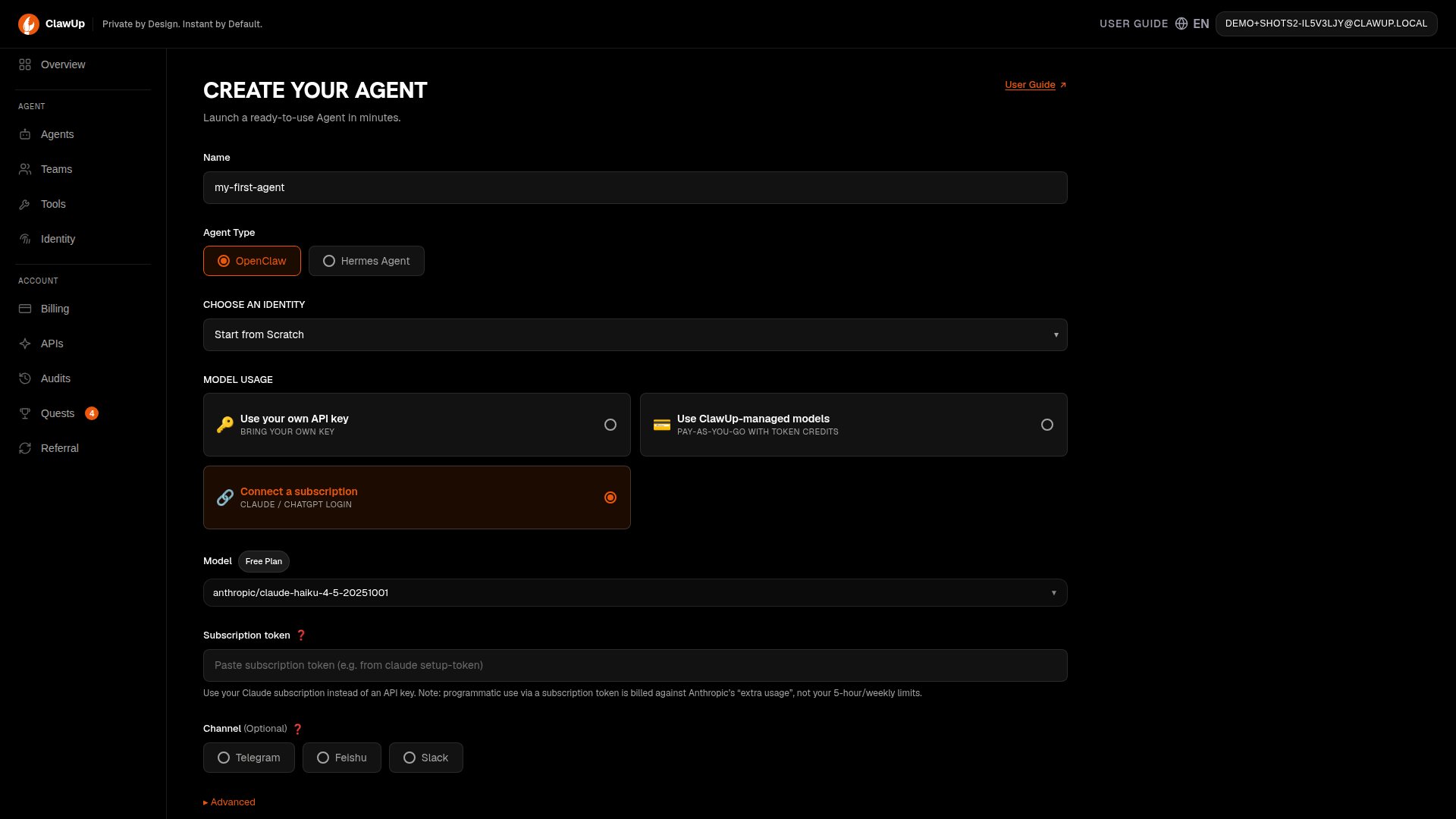
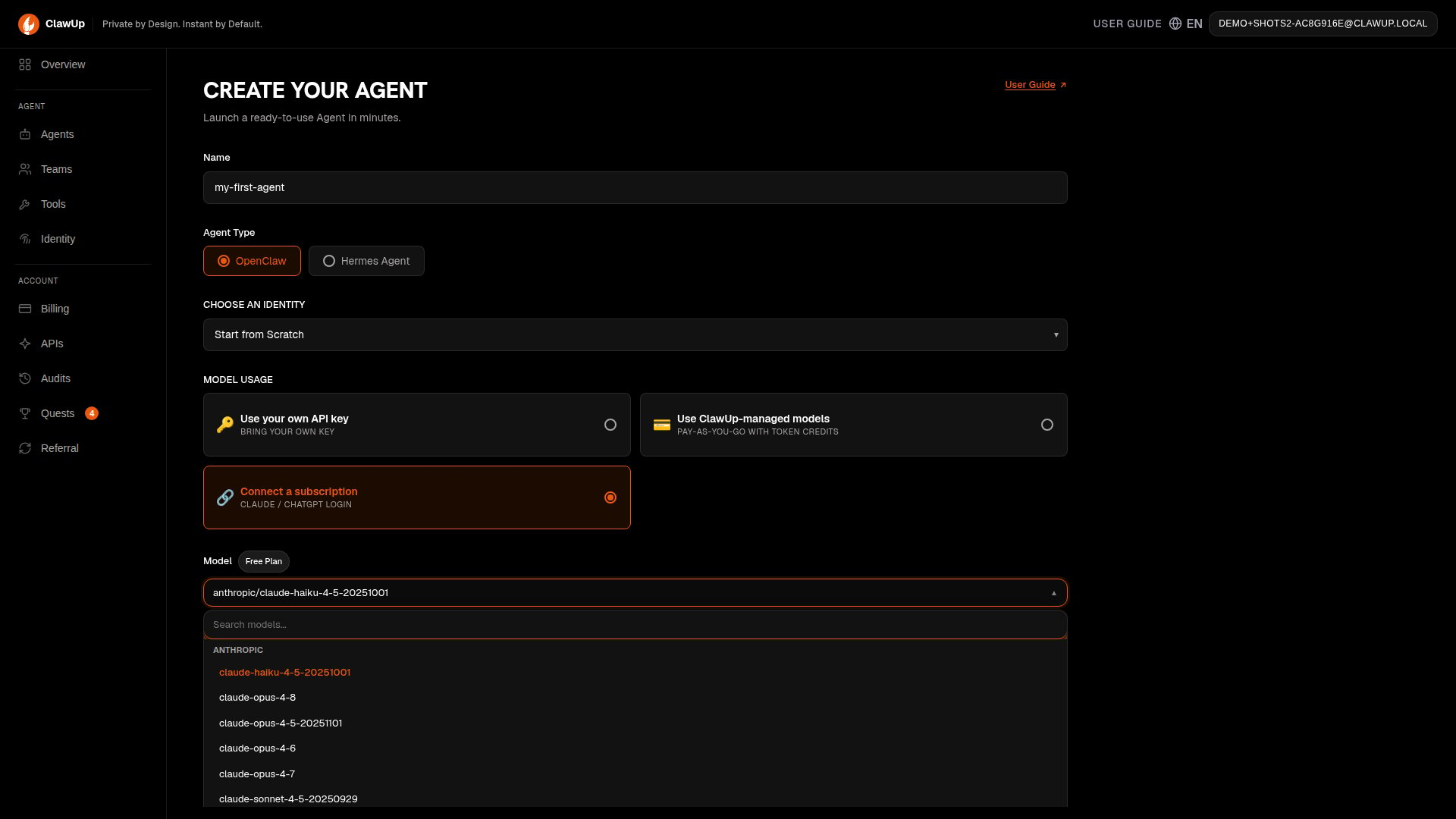
The token field expects thesk-ant-oat01-…value. A subscription token (sk-ant-oat01-…) is sent as a Bearer login; any other value is treated as a plain API key, which a Claude subscription will reject.
Troubleshooting (Claude)
- Agent replies with
HTTP 401 … invalid x-api-key. The value you pasted wasn’t ansk-ant-oat01-…token — almost always the authorization code copied from the browser (the…#…string) rather than the token printed in the terminal. Re-runclaude setup-token, copy thesk-ant-oat01-…value from the terminal, and update the agent’s subscription token (see Refreshing an expired credential below). (Internally: onlysk-ant-oat…credentials are sent as a Bearer login; everything else is sent asx-api-key, which a subscription rejects.) claude setup-tokenonly shows me a…#…code, neversk-ant-oat01-…. You’re reading the browser, not the terminal. Return to the terminal window where you ran the command — paste the browser code there if prompted, and it will print thesk-ant-oat01-…token.- It worked, then stopped after ~a year. The token expired — generate a new one and update the agent (see Refreshing an expired credential below).
Connect a ChatGPT (OpenAI) subscription
You can also connect a ChatGPT subscription. It works differently from Claude: instead of a single token, ChatGPT uses an OAuth credential (access + refresh tokens) that OpenAI’s Codex CLI stores in~/.codex/auth.json.
1. Sign in with Codex
On your own machine, install OpenAI’s Codex CLI and sign in with your ChatGPT Plus / Pro account. The login writes your credential to:2. Create the agent with it
- Under Model Usage, choose 🔗 Connect a subscription.
- Pick an OpenAI / ChatGPT model — GPT‑5.5 is recommended.
- Paste the entire contents of
~/.codex/auth.jsoninto the Subscription field (it’s a JSON blob, not a single token). - Create the agent.
Codex with a ChatGPT account only accepts a subset of models — generally gpt‑5.5 (recommended), gpt‑5.4, and gpt‑5.4‑mini. Some models are gated further (e.g.ClawUp writes that into whichever credential store your runtime reads — OpenClaw’s auth profile store, or Hermes’ owngpt‑5.3‑codex‑sparkis ChatGPT Pro-only) and others (gpt‑5.2,gpt‑5.x‑codex) are API‑key‑only; all of those returnmodel is not supported when using Codex with a ChatGPT account. OpenAI changes this set over time — see Codex models.
openai-codex provider entry — and refreshes it automatically.
Troubleshooting (ChatGPT)
OAuth token refresh failed for openai-codex. The pasted credential is invalid, expired, or partial. Re-run the Codex sign-in, then paste the full, current contents of~/.codex/auth.jsonand update the agent (see Refreshing an expired credential below).out of … usage/ quota errors. Expected when your OpenAI programmatic/Codex allotment is exhausted — see Billing and limits. Agent usage doesn’t draw on unlimited subscription chat.
Refreshing an expired credential
Both credential types eventually need refreshing — a Claudesetup-token after about a year, or a ChatGPT credential if its refresh token itself is revoked or invalidated. You don’t need to recreate the agent:
-
Generate a fresh credential the same way you did the first time —
claude setup-token, or sign in again with the Codex CLI. - In ClawUp, open the Agents list and find the agent, then click Add Model on its card.
-
Since this agent already uses a subscription, the panel shows the matching credential field instead of an API key — paste the new
sk-ant-oat01-…token (Claude) or the full contents of~/.codex/auth.json(ChatGPT). The model stays fixed to this agent’s existing provider; this only refreshes the credential.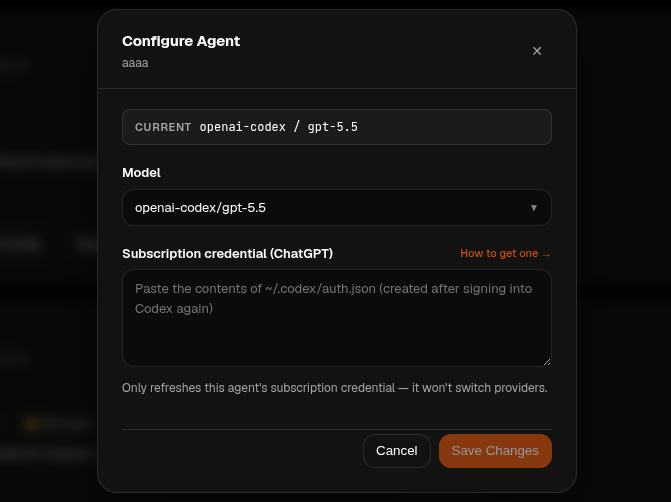
- Save. ClawUp verifies the new credential works before applying it — if it’s still bad, the agent keeps its last working credential and you’ll see an error instead of a silently broken agent.
Billing and limits
An agent’s calls are programmatic usage, which the provider meters on a different track from your interactive chat. This is the part most people get wrong:- Claude. A
setup-token(Agent‑SDK‑style) credential is not counted against your interactive 5‑hour / weekly limits. Anthropic intends a separate monthly “Agent SDK” credit (100 Max 5×, $200 Max 20×) to cover it, but that credit was paused on 2026‑06‑15 — so today the calls fall through to “extra usage” (pay‑per‑token credits at claude.ai/settings/usage). If extra usage isn’t enabled, the agent repliesLLM request rejected: You're out of extra usage. So you can have full chat quota left and still need extra usage enabled for the agent. This is Anthropic’s policy and is in flux — check their current rules. - ChatGPT. Codex/Agent usage is metered against your OpenAI usage allotment for programmatic Codex use, the same way the Codex CLI is — not unlimited subscription chat.
- ClawUp’s part. ClawUp adds no token fee and bills only compute + storage (see Billing); the provider’s usage rules above are separate and still apply.
Good to know
- Credential refresh is automatic — the runtime keeps the login fresh, and your agent’s credentials are preserved across stop/start and restore.
- Expiry —
claude setup-tokentokens last about a year; ChatGPT credentials refresh via the stored refresh token. If a credential lapses, regenerate it and update the agent — see Refreshing an expired credential. - Security — these credentials are sensitive. ClawUp stores them only inside your agent’s runtime; revoke them from your Claude / ChatGPT account if ever exposed.
Related
- Billing — plans, pricing, and the three model-access modes
- Runtimes — OpenClaw vs Hermes
- OpenClaw OAuth concept · Claude Code authentication